The Ultimate Guide to Using a Heat Press

Are you looking for an easy way to customize your clothing and accessories? If so, a heat press might be the perfect tool for you! Not only is using a heat press simple, but it also provides quick results with amazing quality.

This comprehensive heat press guide will cover everything you need to know about operating a heat press safely and effectively to get the most out of every project. From detailed instructions on using a heat press to creative design ideas for fantastic projects, by the end of this guide, you’ll have all the knowledge necessary for turning ordinary materials into brilliant finished works!

What is a heat press and why should you use one for your project?

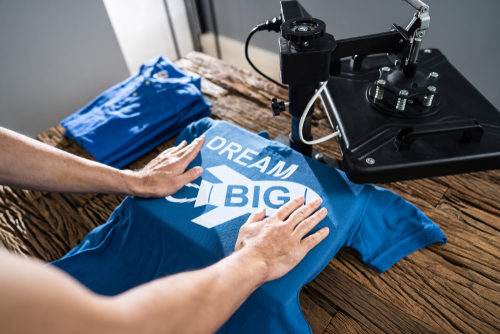
A heat press is essential for any DIY project where you must apply heat and pressure to create a design. It’s perfect for pressing designs onto fabrics, paper, wood, and glass.

Not only does it make creating unique designs easier, but it also ensures that your finished product has a professional finish every time. Heat presses use heated platens (plates) to transfer heat evenly and quickly onto whatever material you are working with.

The heating element is usually adjustable, so you can control the temperature depending on what kind of fabric or material you are using based on the standard easy-press heat guide. This makes it much easier than doing this manually with iron or another open flame source. Plus, the even heat distribution helps ensure that your design transfers perfectly.

Using a heat press also saves you time and money, as you don’t have to buy or use expensive printing equipment or materials. All you need is the correct type of paper for your material and some heavy-duty transfer paper for transferring designs onto fabrics.

After just one press, your project will be finished with a pristine finish every time! If you’re looking to create unique designs quickly and easily, a heat press is the way to go. Get creative and start pressing!

How to select the right type of heat press for education use

Once you’ve narrowed down the type of heat press, it’s time to consider which features are important for your educational use. There are a few key factors that you should evaluate before making your decision:

  • Size: Most presses come in various sizes, so choose the one that best fits your needs and workspace. For larger projects or multiple prints at once, look for presses with large plates and a wide opening for easy loading, but most classroom projects could be executed with a mini heat press.
  • Temperature control: Look for presses with precise temperature control to ensure accuracy when applying transfers or other materials during production. This is especially important when working with more delicate fabrics like polyester or silk blends. Be sure to follow the heat press temperature guide.
  • Power: Check the wattage of any press you are looking at. You want a powerful press to handle your needs without overworking the motor or heating elements.
  • Ease of Use:Consider how user-friendly a particular heat press will be for your students and staff. Decide whether digital displays with multiple programmable settings would be beneficial or if a more basic setup with manual temperature adjustments would suffice.

The best materials to use with a heat press

Heat presses are a great way to make custom garments and products. There are plenty of options regarding what materials you should use with your heat press! Depending on your project, some materials work better than others.

Here’s an overview of the best materials to use with a heat press:

  • Cotton: Cotton is one of the most common fabrics used with heat presses and is highly recommended for T-shirts, hats, or any other items exposed to high temperatures. It provides good coverage and can withstand repeated uses without losing shape or color.
  • Polyester: Polyester works excellent when combined with other materials, such as cotton, since it offers extra durability and is more resistant to fading. It also helps with wrinkle resistance, making it ideal for any project requiring a lot of detail or intricate designs.
  • Acrylic: Acrylic fabrics are great for heat presses because they’re lightweight and flexible. They won’t shrink when exposed to heat, so you can create complex shapes without fear of warping. Plus, acrylics come in various colors and textures to choose from!
  • Spandex: Spandex is the perfect fabric if you need something form-fitting. Not only does spandex provide excellent stretch and movement, but it also allows air circulation, which makes it comfortable to wear all day long.

Creative ideas on how to use a heat press for educational purposes

Heat presses can be an excellent tool for educators looking to add a creative element to their lesson plans. These machines allow you to quickly transfer images and text onto fabric, making them perfect for creating classroom decorations, personalized t-shirts, and more!

Other uses you can use a heat press for to make learning fun and engaging include:

  • Make custom patches or badges with your school’s logo. This is an easy way to promote school spirit and give students something they can proudly wear on their uniforms or backpacks.
  • Use heat transfers to create science lab jackets for advanced biology classes. Students can show off their knowledge (and style) by decorating the jackets with symbols of various elements and molecules.
  • Have students create t-shirts with their designs to express and share their creative ideas in an art class.
  • Create fabric banners or flags to decorate your school’s hallways for a special event or holiday.
  • Make personalized “memory quilts” for graduating classes, complete with photos, drawings, quotes, and other meaningful mementos printed on squares of fabric.

These are just a few ways to use a heat press to make learning fun and engaging! With some creativity and imagination, you can come up with even more educational uses for this versatile machine. Get inspired!

Tips on how to properly apply pressure when using a heat press

For those new to using a heat press, it’s essential to understand how much pressure should be used when applying the vinyl or transfer. Too little and you won’t get the desired results; too much and you risk damaging your material.

Here are some tips on getting it just right:

  1. Start with light pressure until you feel the required force well. You can always add more as needed.
  1. Gently rock back and forth over the areas needing more coverage while maintaining even pressure. This will help ensure that all design parts come out evenly pressed on the fabric or substrate.
  1. Use a ruler or other precision tool to help you make sure that the pressure is level and even. This will also help guarantee that your design looks neat and professional.
  1. Always keep an eye on the pressure gauge and make sure that it remains within the recommended range for your material.
  1. If you’re working with thicker materials, use more pressure than usual to fully transfer all design parts onto the fabric or substrate.

We have the perfect heat press machine for your needs!

For a heat press machine tailored to educators’ needs, there is no better choice than AGC Education. Our heat presses are perfect for printing promotional materials, decorations, and more. With a wide range of designs and colors, you’ll find what you need!

If you’re looking for the most reliable heat press machine to stand up to your learning projects, look no further Than AGC Education. Contact us today and get ready to experience the power and versatility of a quality Heat Press Machine!

Best Resin 3D Printers

Are you looking for the best resin 3D printer to create unique miniatures? Resin 3D printers are becoming increasingly popular in classrooms and schools. They’re great for creating miniatures, prototypes, and other small objects with high accuracy and detail. With so many models on the market, it can be hard to know which one is right for your needs.

We’ve researched to help you find the best resin 3D printer for miniatures. Our guide will provide all the information you need to decide which model is right for your classroom or school. Read on to learn more about finding the perfect resin 3D printer!

IMAGIN3D Printer Package

black and yellow 3d printer

If you’re looking for an all-in-one package that won’t break the bank, then this is the the first place to look. The IMAGIN3D Printer Package comes with everything you need to get started right away.

It includes the following:

  • The printing platform has a large size to accommodate larger projects
  • A volcano extruder that quickly and forcefully pushes out material
  • Teacher resource kit to help educators get their students up and running
  • 3D design and editing software that’s easy to use
  • Supply and maintenance kit to keep your printer in top condition

This package lets you start printing immediately, saving your school time and money. The IMAGIN3D Printer Package is a convenient way for educators on a budget who don’t want to compromise on quality. This 3D printer comes with a 2-year warranty for repair or replacement and ongoing support from our team.

ELEGOO Mars 2 Pro

The ELEGOO Mars 2 Pro is a popular alternative to the IMAGIN3D for anyone looking to create highly detailed miniatures and other 3D objects. Setting up and leveling this printer is very easy, and you can start printing in no time with excellent results. The machine is sturdy and operates quietly.

Additionally, it has an attractive appearance that blends well in any space it is placed.

Furthermore, the lid protecting against UV rays fits tightly and prevents most resin fumes from escaping. This printer also has a 2K monochrome screen that has a long lifespan.

Here are the other features to consider:

  • The active carbon built into the product is capable of absorbing resin fumes
  • The Mars 2 Pro is capable of supporting 12 different languages
  • The Mars 2 Pro printer is made from aluminum that was machined using CNC technology.

The ELEGOO Mars 2 Pro printer creates miniatures with good accuracy and detail. its powerful components can produce incredible results that will meet all your needs. With its user-friendly interface and reliable performance, this printer takes your 3D printing skills to the next level.

ANYCUBIC Photon Mono Resin 3D Printer

The ANYCUBIC Photon Mono is one of the most popular 3D printers for miniatures. t has a 2K monochrome LCD screen that produces excellent results no matter what you’re printing. The machine has a monochrome screen and a faster printing capability, which helps to reduce energy usage.

Other features include:

  • USB connection
  • 8 inch Touch Screen
  • Replacing the FEP is a simple and fast task
  • A transparent cover that is capable of blocking 99.95% of UV light

The ANYCUBIC Photon Mono is able to create useful, attractive miniatures. The cost of this 3D printer is high, so you should only consider it if you are serious about getting a lot of use out of this machine.

Creality Halot-One Plus

The Creality Halot-One Plus is a fine 3D printer for anyone looking for a lower-cost option. The printer features a 7.9-inch Mono LCD with a 4K resolution of 4320 x 2560. It also has a dual linear rail Z axis and fast 3-second per-layer cure times, enabling fast and accurate printing.

The other features include:

  • Air filtration with activated carbon to reduce the smell of resin
  • The LCD interface is 5 inches large, and it is both bright and fast.
  • The printer has Wi-Fi connectivity and allows for remote monitoring of print jobs
  • The Halot BOX slicer software has an intuitive interface and is straightforward to operate

If you’re looking for an inexpensive 3D printer, the Creality Halot-One Plus could be just what you need. The Z endstop is positioned at the top of the Z stage, allowing for easier calibration and better stability. Additionally, the process of cleaning Four bolt build platform leveling can be challenging. Be prepared to invest some time in getting started with this one.

IMAGIN3D JUNIOR- 3D Printer Package

For educators looking for an affordable and easy-to-use 3D printer package, the IMAGIN3D JUNIOR is the solution. This model is smaller than the standard IMAGIN3D printer, making it a good fit for compact offices and classrooms.

The IMAGIN3D JR. Printer is a compact device that measures just over 15 inches in height and can be conveniently placed on your desk. Despite its small size, it offers an 8-cubic-inch printing area.

This 3D printer package comes with a lot of features that make the learning process easy for educators and students alike:

  • 3D design and editing software that helps you create 3D designs.
  • Template Libraries of 3D models to use in projects.
  • Includes two rolls of PLA filament as well as a maintenance kit for 3D printers.
  • The warranty coverage provides two years of protection with the option to either repair or replace the item.


The IMAGIN3D JUNIOR- 3D Printer Package is perfect for educators who are looking for a best-budget resin 3d printer that offers easy setup, high print quality, and great technical support. With this package, you can get your students printing in no time and make learning more interesting!

 Voxelab Proxima

The Voxelab Proxima is a great 3D printer that offers professional-grade quality for an affordable price. This 3D printer that uses resin is suitable for beginners who want to try resin printing. The device has a good size, and its 2K mono screen is durable.

The Proxima also has features like:

  • This printer has a 3.5-inch touchscreen
  • A bed leveling system that provides assistance and simplifies the process
  • Full Grayscale Anti-aliasing to produce better prints
  • A built-in air filtration system for improved smell reduction
  • High-precision Linear Guide Rail, which helps to reduce noise and create smoother prints

The Voxelab Proxima is an excellent 3D printer for anyone looking to create detailed miniatures without stretching your budget too much. This could be a great introductory printer if you’re just getting into resin printing.

Get Professional-Grade 3D Prints With Resin 3D Printers

There are many options for educators and students looking for a reliable 3D printer. From the ELEGOO Mars 2 Pro to the IMAGIN3D JUNIOR- 3D Printer Package, each of these printers offers unique features that can help you create amazing miniatures with precision and detail. Depending on your needs, budget, and level of resin printing expertise, any of these choices could be the right design for you!

At AGC Education, we’re committed to helping schools across the country find solutions that inspire their students. Our team is here to answer any questions you have about our products or services, so don’t hesitate to reach out to us today if you need assistance finding the best 3D printer option for your school’s needs!

Best Budget 3D Printers

Are you looking for the best budget 3D printer? 3D printing is becoming increasingly popular in classrooms and educational settings. It’s a great way to engage students with hands-on learning while teaching them valuable problem-solving and critical-thinking skills.

However, finding the right 3D printer can be tricky – especially if you’re on a tight budget. That’s why we’ve researched for you! We have compiled a list of the best budget 3D printers perfect for any classroom setting.

From entry-level models to more advanced options, there is something here for everyone. Keep reading to discover what is the best budget 3D printer – and start introducing your students to the exciting world of 3D printing!

IMAGIN3D JUNIOR- 3D Printer Package

The IMAGIN3D JUNIOR 3D Printer Package is a fantastic option for schools looking to introduce 3D printing into their classrooms. The hardware comes with STEM 3D software, which is included and helps you jump into 3D printing without extensive prep time.

This package comes with everything you need to get started, including:

  • The 3D supply kit contains two rolls of PLA filament (and a full rainbow of further color options are available when you need them).
  • 3D printer maintenance kit to keep the printer running smoothly
  • The product is covered by a warranty for two years, during which time it will either be repaired or replaced if necessary.
  • Professional development and training resources that will assist you in maximizing the benefits of your 3D printer.

This 3D printer is perfect for classrooms. It’s easy to use, and the software simplifies integrating 3D printing into your curriculum. The IMAGIN3D JUNIOR 3D Printer Package is a great option for educators looking to introduce their students to the exciting world of 3D printing.

IMAGIN3D – 3D Printer Package

Imagin3D Mini

Another excellent product from AGC Education is the IMAGIN3D 3D Printer Package. This package offers a powerful, professional-grade 3D printer with integrated software that educators can use. The software has been designed for easy use and has advanced features that will help you create intricate prints.

The following are the features of this printer package:

  • The 3D software for STEM comes with editable template libraries specific to education.
  • The maintenance kit for 3D printers also includes a supply kit consisting of 2 rolls of PLA filament.
  • The printer comes with a 2-year warranty that covers either repairs or replacement, as needed.
  • The printer has a maximum printing area of 12 inches by 12 inches and can print objects up to 18 inches tall.

Just like with the IMAGIN3D JUNIOR, we offer ongoing support and access to professional development and training materials. This is perfect, as it will allow teachers to maximize their use of the 3D printer. If you’re looking for a powerful, professional-grade 3D printer that is easy to use, the IMAGIN3D 3D Printer Package is an excellent choice.

XYZPrinting Da Vinci Mini

This 3D printer is an excellent option for beginners. It’s easy to use and understand, so even younger students can use it with minimal guidance. The XYZPrinting Da Vinci Mini is a reasonably-priced 3D printer that is simple to install and operate.

The da Vinci Mini is a printer that has black trim and is colored a bright pumpkin orange. It measures 14.2 by 15.4 by 13.2 inches and weighs 24.3 pounds. The extruder nozzle is located behind the assembly and is difficult to access. This location protects against accidental burns, despite the open frame design.

Here are the other features of the da Vinci Mini:

  • Before each print, the print bed is automatically leveled.
  • It uses “smart cartridges” that detect when the filament is running low and requires replacement.
  • To download the software, you must create an account protected by a password on the XYZprinting website.
  • This device can produce prints either through a USB or Wi-Fi connection

Toybox 3D Printer

The Toybox 3D Printer is an affordable and easy-to-use device designed for children, making it an attractive choice in elementary education. This printer lets you easily print basic items from your iOS or Android device or a web browser with one touch. The software offers over 2,000 printable objects or projects to choose from and allows you to import 3D files created outside of the program.

The following are the features of the Toybox 3D Printer:

  • The type of 3D printing technology used is called Fused Filament Fabrication
  • The maximum build area is 3.5 inches in length, 3.1 inches in width, and 2.8 inches in height
  • The weight of the 3D printer is 6.6 pounds
  • The warranty for both parts and labor is valid for one year

The build area of this 3D printer is small, and it may not be suitable for importing 3D files that were created on another platform. If you’re looking for a 3D printer with a larger build area and more features, this may not be the right choice for your classroom.

Anycubic Vyper

The Anycubic Vyper is a budget-friendly 3D printer designed for beginners. It features an open-frame design with the print bed located at the front. This makes it easy to access and provides a clear view of the prints as they are being created. The printer can create bigger prints and has automatic bed leveling support.

The Anycubic Vyper has the following features:

  • It uses Fused Filament Fabrication (FFF) 3D printing technology
  • The dimensions of the printer are 20.3 inches in height, 20 inches in width, and 18 inches in depth.
  • You can use the Cura software to create prints, which can then be transferred either via an SD card or printed directly through a USB connection.
  • Anycubic offers a range of filament materials such as PLA, ABS, TPU, and PETG, all of which are compatible with the Vyper.

The printer comes with a small starter filament coil. To use Cura software with the Vyper, you need to make a few changes to the settings. It is important to be aware of this before purchasing.

Monoprice Mini Delta V2 3D Printer

The Monoprice Mini Delta V2 3D Printer is a great budget option for classrooms. It’s an easy-to-use printer that prints detailed models in a wide variety of materials. The printer is equipped with an adaptive touch screen and advanced auto-leveling feature. Additionally, it operates quietly so that it won’t disrupt the learning environment.

The Monoprice Mini Delta V2 includes the following features:

  • This printer can print in one color and has one extruder
  • The device has an LCD screen and primary interfaces, including a microSD card, USB 2.0, and Wi-Fi.
  • The V2 printer is colored matte-black and has a strong steel and anodized aluminum frame.
  • It is 17.5 inches in height, 11.8 inches in width, and 11 inches in depth.
  • The printer can print objects with dimensions up to 4.7 inches in height, 4.3 inches in width, and 4.3 inches in depth.
  • The package contains a small polylactic acid (PLA) filament starter coil along with the V2

The printer has a one-year warranty and offers fast almost error-free printing. It is great for beginners, making it easy to assemble and use.

Find the Right 3D Printer for Your School

No matter your budget or 3D printing needs, AGC Education has the perfect solution for you. Whether it’s our IMAGIN3D JUNIOR- 3D Printer Package with its STEM software; or the more powerful, professional grade IMAGIN3D- 3D Printer Package that prints objects up to 18 inches tall, we have something for everyone!

All of these products come with great warranties and access to ongoing support, making them ideal solutions for educators looking to introduce their students to the world of 3D printing. With all these options available, what are you waiting for? Let us help you find the best option today! Contact us today, and we’ll be sure to help you find the perfect 3D printer package for your needs!

How to Learn 3D Printing – Ultimate Guide

Are you looking to add 3D printing skills to your repertoire? 3D printing is a rapidly growing technology that has made waves in the manufacturing industry.

It creates opportunities from prototyping to production and allows creative minds to explore new concepts and products. With its rise in popularity, more people are beginning to ask, “How hard is it to learn 3D printing?”

Fortunately, learning how to master 3D printing doesn’t have to be intimidating! We’ve compiled a comprehensive guide on everything you need to know about coming up to speed with this versatile technology.

Understand the Basics of 3D Printing Technology

3D printing technology has revolutionized the way parts and products are created. Using special software and hardware, it makes three-dimensional solid objects from a digital file. A 3D printer can produce complex shapes accurately and consistently, which was only possible after this technology became available.

3D printers use various materials such as plastics, metal, ceramics, or composites to build components layer by layer in a method known as additive manufacturing.

This allows for much greater control over the shape and integrity of the parts than traditional methods like machining or injection molding. The ability to rapidly prototype an object quickly and cost-effectively makes 3D printing ideal for prototyping applications and low-volume production runs.

How to Learn 3D Printing For Education Purposes

3D printing is a valuable tool for educational purposes. It can be used to create models, prototypes, and even furniture. With its unique capabilities, it can help students learn about different subjects engagingly.

Here are some tips on how to learn 3D printing for education purposes:

  • Know the Basics of 3D Printing: Before you start learning 3D printing, it’s important to understand the basics of the process and what it involves. Start by familiarizing yourself with the types of materials that can be used in 3D printing and the machinery involved with creating objects from those materials. Also, look into the software needed to design your object before printing.
  • Get Access to a 3D Printer: Once you understand the basics of 3D printing and know what kind of printer you need, it’s time to access one. You can purchase your own or borrow one from a library or community center.
  • Start with Simple Projects: To get comfortable with 3D printing, it’s best to start with simple projects. This will allow you to practice using the technology and understand it without worrying about complex designs.
  • Utilize Resources: Take advantage of online resources such as tutorials, forums, and videos that can help you learn more about 3D printing and any issues you might have with the process. You can also look into attending workshops or classes on 3D printing, where you can get in-depth instruction from experienced professionals.

How To Learn 3D Printing Design for Student Learning

3D printing provides an exciting opportunity for educators to help their students explore new learning opportunities. With 3D printing, educators can create custom objects and models to engage students in learning. Furthermore, 3D printing allows educators to quickly produce prototypes and other items to test students’ ideas.

Here are some ways that educators can learn 3D printing design for student learning:

Become familiar with the software tools available

Educators should familiarize themselves with 3D modeling and CAD (computer-aided design) software programs available for creating 3D prints. These programs allow users to develop complex plans printed with multiple materials. The more knowledgeable an educator is about the software, the better they can help their students create attractive 3D prints.

Read up on the basics of 3D printing

Educators should also take some time to learn about the basics of 3D printing and how it works. Knowing the fundamentals will help them understand 3D printing capabilities, material options, and other considerations when helping their students create designs for 3D printing.

Research online resources

Many great online resources are available that provide tutorials, tips, advice, and support for educators wanting to learn about 3D printing design for student learning. Reading blogs from experienced professionals in the field can be a great way to get started with creating exceptional designs for their students to explore. 

Participate in 3D printing courses

A variety of courses are available online and at universities that focus on teaching the fundamentals of 3D printing and design. Participating in these classes is an excellent way for educators to learn the basics and understand how to use them to help students develop their designs.

Benefits of Educators Exploring 3D Printing Designs

3D printing designs can open up a world of possibilities for educators. Through 3D printing, educators can introduce their students to exciting new concepts and foster creativity in the classroom.

Here are some of the key benefits of exploring 3D printing designs with your students:

  • Improved Creativity: By introducing 3D printing into the classroom, educators can help students become more creative and explore new ideas. With easy-to-use tools like Tinkercad or Sketchup, students can design their 3D models from scratch and print them out in just a few hours. This encourages creative expression through hands-on learning and helps develop problem-solving skills. 
  • Relevant Learning Experiences: Exploring 3D printing designs can provide students with real-world experiences they may not get in a traditional classroom setting. By creating their models, students understand how the physical world works and can interact with technology from an early age.
  • Accessible Learning: With access to 3D printing designs, educators can make learning more accessible for everyone. Students who might struggle to understand certain concepts or comprehend complex diagrams can now easily create visual representations of their ideas with 3D-printed models. This makes learning easier for all types of students and helps level the playing field for everyone involved.

Types of 3D Printing Designs Educators Can Use

3D printing designs can enhance a wide range of educational activities. From STEM curriculum to art classes, 3D printing can bring creativity and excitement into the classroom.

Here are some of the most popular types of 3D printing designs that educators can leverage for their teaching:

  • Educational Models: 3D printed models make it easier for students to visualize complex concepts such as anatomical structures, mathematical equations, or chemical reactions. Educators can also use these models to teach architecture or engineering principles interactively.
  • Prototypes: By using 3D-printed prototypes, educators can create real-life versions of virtual objects and show students how prototyping works in the development process. Students will be able to observe how changes in the design affect the prototype’s performance or shape.
  • Customized Tools: 3D printing can also create tools specific to a student’s need, like customized accessibility aids, prosthetics, and therapeutic devices. Educators can use this technology to teach students about problem-solving and customization.
  • Art Projects: 3D printing designs can provide an innovative way for educators to explore creative projects with their students. With this technology, educators can bring ideas to life in ways never before possible and allow their students to see their work displayed in museums or galleries.

Upgrade your classroom tech experience with 3D Printing

Learning 3D printing can be an exciting and rewarding experience. With the help of AGC Education, you can jump into learning 3D printing with confidence. AGC Education is dedicated to providing innovative professional technology solutions for educational institutions needing 3D printers.

With hands-on experience from our experts, you have access to the necessary materials and resources to become a pro in no time. We know there is so much potential in 3D printing, and we are determined to help you reach your goals.

In addition, we also offer exceptional technical support for any issues you may encounter along the way. If you are ready to take on the challenge of learning 3D printing, do not hesitate! Contact us today for access to the best educational tools and technology!