




School Laminators: Hot and Cold Models, Film and Ordering for Schools
Lesson plans, student work and signs wear out fast, so school laminators seal paper in a clear layer that lasts all year. AGC Education (AGC), a classroom technology and supplies store formerly known as Tonas Graphics, sells four laminators, from a 9 inch desktop cold model to a 44 inch large format cold model, plus laminating film. It has partnered with educators since 1985. This page explains hot and cold lamination, film, widths, safety, pricing and ordering.
Why AGC
What Schools Get With Laminators From AGC Education
AGC Education sells classroom technology equipment and supplies to schools, and its tagline is 'Helping Schools to Communicate, Educate, and Inspire'. It only sells brand new equipment from manufacturers, and most products are in stock and ready for shipping.
Educational pricing is available, and adding items to the cart shows discounts based on order quantity.
Educator support includes lifetime technical support on all tools, and 90% of service calls are resolved over the phone at no charge. Basic user training is provided at no charge on all tools, including every laminator, and on-site training is available.
The store sits at 600 Bursca Drive, Suite 601, Bridgeville, Pennsylvania 15017.
Shop Laminators for Schools
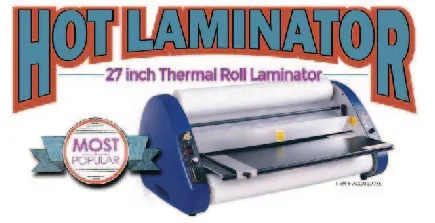
 27" Hot Press Laminator: Built for Schools, Designed to Last
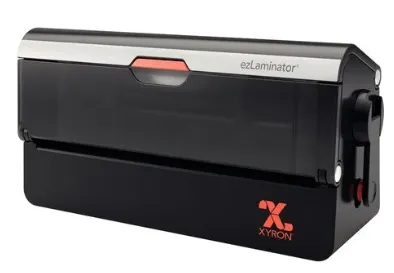
 Xyron ezLaminator: 9" Desktop Cold Laminator for Quick, Cord-Free Protection
 Xyron Pro XM2500: 25" Professional Cold Laminator for Schools and Creative Teams
 Xyron Pro XM4400: 44" Large Format Cold Laminator for Professional, Heat-Free Finishing
Pricing
Laminator Prices, Film Costs and Shipping
This page states no price for the four machines and lists no bundle deals, so a school checks the cart for its educational pricing. Here is where each school laminator and its film stands today:
- Xyron ezLaminator (9 inch desktop cold laminator): no price on this page
- Xyron Pro XM2500 (25 inch professional cold laminator): no price on this page
- AGC 27 inch Hot Laminator: no price on this page
- Xyron Pro XM4400 (44 inch large format cold laminator): no price on this page
- 3 Mil Hot Lamination Film, in 25 in. x 250 ft. or 27 in. x 250 ft. rolls with a 1 inch core: from $61
AGC Education sends most orders out the same day. An order placed after 3 in the afternoon, Eastern time, goes out the next business day. Average UPS (the delivery carrier) transit time is 1-5 days.
How it works
How to Order a Laminator for Your School
Follow these steps to bring a laminating machine into a classroom or workroom.
- Pick the width your materials need: 9, 25, 27 or 44 inch.
- Choose hot or cold lamination using the comparison below.
- Add the laminator and matching film to the cart.
- Read the quantity discounts that the cart shows.
- AGC Education sends most orders out the same day, and UPS delivers in 1-5 days on average.
- Call lifetime technical support whenever a question comes up.
School Laminators and Lamination Film in the Store
Open the laminators category to compare school laminators by width and type, then visit the lamination supplies category for film.
More detail
Which Laminators the Shop Carries for Schools
The laminators category in the AGC Education shop holds four machines. The Xyron ezLaminator is a 9 inch desktop cold laminator, and its listing calls it cord-free. The Xyron Pro XM2500 is a 25 inch professional cold laminator for schools and creative teams.
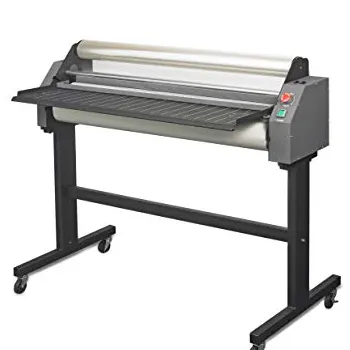
The Xyron Pro XM4400 is a 44 inch large format cold laminator that finishes work without heat. The AGC 27 inch Hot Laminator is the one hot press model in the range, and its listing says it is built for schools.
Laminating film and other supplies sit in a separate shop category, so a buyer can order a machine and its film in one visit. Each machine page shows its description, and the cart shows educational pricing.
Those four choices cover the dimensions most schools need, from a single desk to a full production table. The sections below explain how each school laminating choice works.
Hot and Cold Laminators Compared for Classrooms
A thermal laminator heats its rollers so the adhesive on the film melts and bonds to the paper. A cold laminator uses pressure and a sticky film instead, so it needs no heat. Both kinds of laminators suit different school jobs, so the choice depends on the work.
Choose a hot machine when a teacher seals worksheets by the stack and wants a stiff finish. Choose a cold machine when students seal photos, art or posters.
Thermal Roll Laminators
A thermal roll laminator suits worksheets, flashcards and signs that need a stiff, glossy finish. A hot machine needs an electric outlet and time to reach its working temperature, and its heat settings must match the film. Teachers who laminate every week often choose this type.
Cold Lamination
Cold lamination suits photos, posters and prints that heat could curl or smear. Three of the four AGC Education machines are cold laminators, so students can load work without waiting for rollers to warm up. Cold film is a different product, so check the film type before ordering.
Laminator Features to Compare Before You Order
Every laminating machine lists specifications, and a few of them decide how well it works in a school. Compare these features on the product page and ask support about any that are missing:
- Width and the widest sheet it takes
- Heat settings and temperature settings, for hot models
- Feeding speed, often given in inches per minute
- Film thickness range, and pouch thickness range
- Jam release lever and reverse control
- Auto shut-off and covered rollers
- Weight, handles and cord, for a portable unit
Higher speed helps a busy workroom, while a compact body helps a single classroom. A corner rounder is a separate accessory, so ask whether the shop carries one.
Laminating Film, Thickness and Pouches
Film thickness is measured in mils, and one mil is a thousandth of an inch. Thin film stays flexible for handouts and papers, while thick film feels stiff and protects posters, boards and tags that students handle every day.
Laminating Film
The shop sells 3 Mil Hot Lamination Film in 25 in. x 250 ft. and 27 in. x 250 ft. rolls with a 1 inch core. The roll width must match the machine, and the core size must fit its roller holders. A buyer can ask support to confirm the fit before ordering.
Laminating pouches are pre-cut sleeves that hold one sheet. Pouches work for small jobs such as name tags and cards, while roll film handles long runs of posters and charts. Pouch thickness also uses mils, so the same rule applies.
Cold film and hot film are not interchangeable, so a workroom with both types of machine keeps each kind of roll labeled and stored flat, away from heat and dust.
Choosing a Laminator Width in Inches
Width decides what a laminator can seal. A 9 inch desktop unit handles letter sized documents, cards and small signs. It also stores easily in a cabinet, so one teacher can keep it close at hand.
The 25 inch and 27 inch machines take wider sheets, such as classroom posters, bulletin board pieces and two-page spreads. They fit a workroom table shared by a grade level or a department.
The 44 inch machine seals large posters, banners and hallway displays. It needs a long table or stand, and it suits a library, front office or media center that finishes big projects for a whole school. Measure your biggest item in inches before you choose.
Matching a Laminator to a Classroom, Workroom or Library
A single classroom works well with the 9 inch desktop cold machine, because it takes little space and needs no warm-up. A teacher can seal a chart between lessons and return to the class.
A teacher workroom shared by a grade level often wants a 25 inch or 27 inch machine. These sizes seal full posters and several pages at once, so volumes of work move faster during a busy week.
A library, media center or front office may pick the 44 inch large format model for banners and big displays. Add a table that is long enough for the roll, and keep film on a shelf within reach.
Related Products
Safety, Warm-Up Time and Jam Control
A school laminator sits where students work, so safety matters as much as speed. Look for a machine with an auto shut-off, a cover over the heating parts and a clear spot for hands during feeding. Cold models remove the heat risk.
How Long Does a School Roll Laminator Take to Warm Up?
Warm-up time depends on the model, so read the specifications before you order. Hot machines wait for their rollers to heat, while a cold laminator has nothing to warm up. A teacher with a short prep period may prefer the cold type.
What Should I Do if Film Wraps Around the Rollers?
Turn the machine off, unplug it and let the rollers cool. Use the jam release lever if the model has one, then pull the film gently, never by force. The manual shows the exact steps, and lifetime technical support is a phone call away.
Caring for a School Laminator
Good care keeps a laminator working for years. Wipe the outer body with a dry cloth, keep the feed slot free of paper scraps and store the machine with its cover closed. Let a hot machine cool fully before you move it.
Never laminate items with staples, glitter or loose stickers, because these can scar the rollers. Run a carrier sheet only if the manual calls for one, and use the film type the model asks for.
Label the shelf for film rolls and pouches so each user grabs the right material. When a problem appears, call lifetime technical support, since 90% of service calls are resolved over the phone at no charge.
What Teachers Laminate in a School
Hands-on learning wears out paper. A laminator turns flashcards, matching games, task cards and learning center mats into classroom-ready tools that students can wipe clean and reuse.
Anchor charts, word walls, schedules and safety signs also last longer under film. Student work and portfolios stay flat and clean for display, and name tags and desk labels survive a full year of use.
The office laminates hall passes, room signs and notices. The library seals book cards and posters. Each job counts toward student outcomes because teachers spend less time remaking worn materials and more time teaching.
Teaching aids made of paper, such as worksheets and game boards, can be sealed after each unit and filed for next year, so the work of one term saves hours in the next.
Laminating Projects That Teach Students
A laminator also supports hands-on learning when an adult supervises the machine. Students can design a map, a number line or a vocabulary card, then watch the sheet pass through the rollers and come out sealed.
Older students can run a classroom job, such as sealing the monthly calendar or the lab safety rules. Younger students can build matching games, sort the finished pieces and trim the edges with safety scissors.
Each project shows students how a team makes a tool that others reuse. A teacher stays at the machine, keeps hands clear of the rollers and handles any hot parts personally.
Questions to Ask Before You Order a Laminator
A short buying guide keeps a purchase on track. Ask these questions of any laminator, from any brand, before a purchase order goes out:
- What is the widest sheet in inches that the machine takes?
- Does it use hot film or cold film?
- Which film thickness and core size does it need?
- Does it have an auto shut-off and a jam release?
- How many users will share it, and where will it sit?
Buying a Laminator for a Classroom or a Whole School
Start with volume. A classroom that laminates a few sheets a week needs a compact unit, while a shared workroom that seals posters daily needs a wider, sturdier machine with film on hand.
Next, check space and budget. Measure the table, count the users and ask support about the film each model takes, because film is a repeat cost. Partner schools often order the machine and a few rolls together.
Then compare the price point of each model and what the cart shows for your quantity. A district that wants to offer every grade level a machine can order several units in one purchase order.
The AGC Education funding page offers downloadable justification guides aligned to several school funding programs. Your district decides whether a laminator purchase qualifies.
Training, Support and Returns After Delivery
Basic user training is provided at no charge on all tools, and lifetime technical support stays with the machine. On-site training and on-site service, hourly or flat-rate, are also available for schools that want a visit.
Report damages and shipping discrepancies within 10 business days of receipt. Returns need a return authorization number and unopened resalable items, and approved returns are credited to the customer account. The store does not accept returns on products received 30+ days ago.
Other Classroom Technology From the Same Store
Many teachers print charts, then seal them under film. AGC Education also sells Educator Plus poster printers, 3D printers, laser engravers, heat presses, sublimation stations and the Cut-Out Studio contour cutter, so one store can supply a whole makerspace.
Behavior charts, schedules and reward boards often start on a poster printer and end in a laminator. Each product line has its own shop category with matching supplies, and the laminators sit beside the lamination supplies.
FAQ
School Laminator FAQ
How much does a school laminator cost?
The shop lists no price for its four laminators on this page. Educational pricing is available, and the cart shows discounts based on order quantity.
What is the difference between thermal and cold roll laminators for schools?
A thermal laminator heats the film, while a cold laminator presses a sticky film onto the paper. Three of the four machines in the shop are cold models, and one is the AGC 27 inch Hot Laminator.
What laminating film thickness should schools use?
Choose thin film for flexible handouts and thick film for items that students handle daily. The shop lists 3 Mil Hot Lamination Film from $61 in 25 in. x 250 ft. and 27 in. x 250 ft. rolls.
Can schools use any brand of laminating film in these roll laminators?
No. The film must match the machine in width, core size and heat type. Ask lifetime technical support to confirm the fit before you order film for any brand.
How do I choose the right laminating film?
Start with the machine, since its width and heat type set the film you can use. Then pick a thickness for the job, and check the core size on the roll. The shop sells 3 Mil Hot Lamination Film with a 1 inch core.
How wide of a roll laminator do schools need?
The shop offers 9, 25, 27 and 44 inch machines. Pick the width of the widest item you plan to seal, then add room for a table and for film storage.
What safety features should I look for in a school laminator?
Look for an auto shut-off, covered heating parts and a clear feeding area. A cold laminator needs no heat, which removes one risk in a busy classroom.
How do I laminate something using my School Laminator?
Place the sheet between the film layers, or slide it into a pouch. Feed it straight into the rollers, wait for it to exit, then trim the edge. Always read the manual for your model first.
What should I know about laminating pouches?
A pouch holds one sheet and suits small jobs such as cards and name tags. Pouch thickness is measured in mils, and the pouch must fit the machine width.
Can a laminator protect behavior charts and posters?
Yes. A laminator seals behavior charts, posters and schedules so students can use them all year. Pick a width that fits the widest chart, and use cold film for prints that heat could damage.
Does AGC Education ship laminators and film to schools?
AGC Education sends most orders out the same day, and orders placed after 3 in the afternoon, Eastern time, go out the next business day. Average UPS transit time is 1-5 days.
Which laminator suits one teacher with a small room?
The 9 inch Xyron ezLaminator is a desktop cold laminator, so it needs little space and no warm-up. Check the width against the widest sheet you plan to seal.
What should a school never put through a laminator?
Skip items with staples, glitter or loose stickers, because they can scar the rollers. Heat can also curl some prints, so use a cold laminator for photos and ink prints.
What heat settings and temperature settings does a thermal laminator need?
The settings depend on the model and the film thickness, so follow the manual. Thick film needs more heat than thin film, and a cold laminator needs no heat settings at all. Ask lifetime technical support if a setting is unclear.
How do mil pouches and pouch thickness work in school laminating?
Pouch thickness is measured in mils, so a thicker pouch feels stiffer and a thinner one stays flexible. Pick the pouch thickness for the job, then check that the pouch fits the machine width before you order.
What laminating machine finish and size suit classroom posters and documents?
A wide machine suits posters, while a narrow desktop unit suits documents and cards. Ask which finish the film offers, and measure the widest poster in inches before you choose the laminating machine.
Is training included with a laminator?
Basic user training is provided at no charge on all tools, with lifetime technical support. On-site training and on-site service, hourly or flat-rate, are available.